
The short version
- Build TikTok creative at 9:16, 1080×1920. Landscape and square can leave most of the vertical canvas unused.
- The safe zone moves with the device, the caption length, the engagement controls, and the ad format. Fixed pixel numbers work for an internal template; they don't replace the placement preview.
- Keep the headline, the product, and your CTA in the middle third, then check the real placement preview in TikTok Ads Manager.
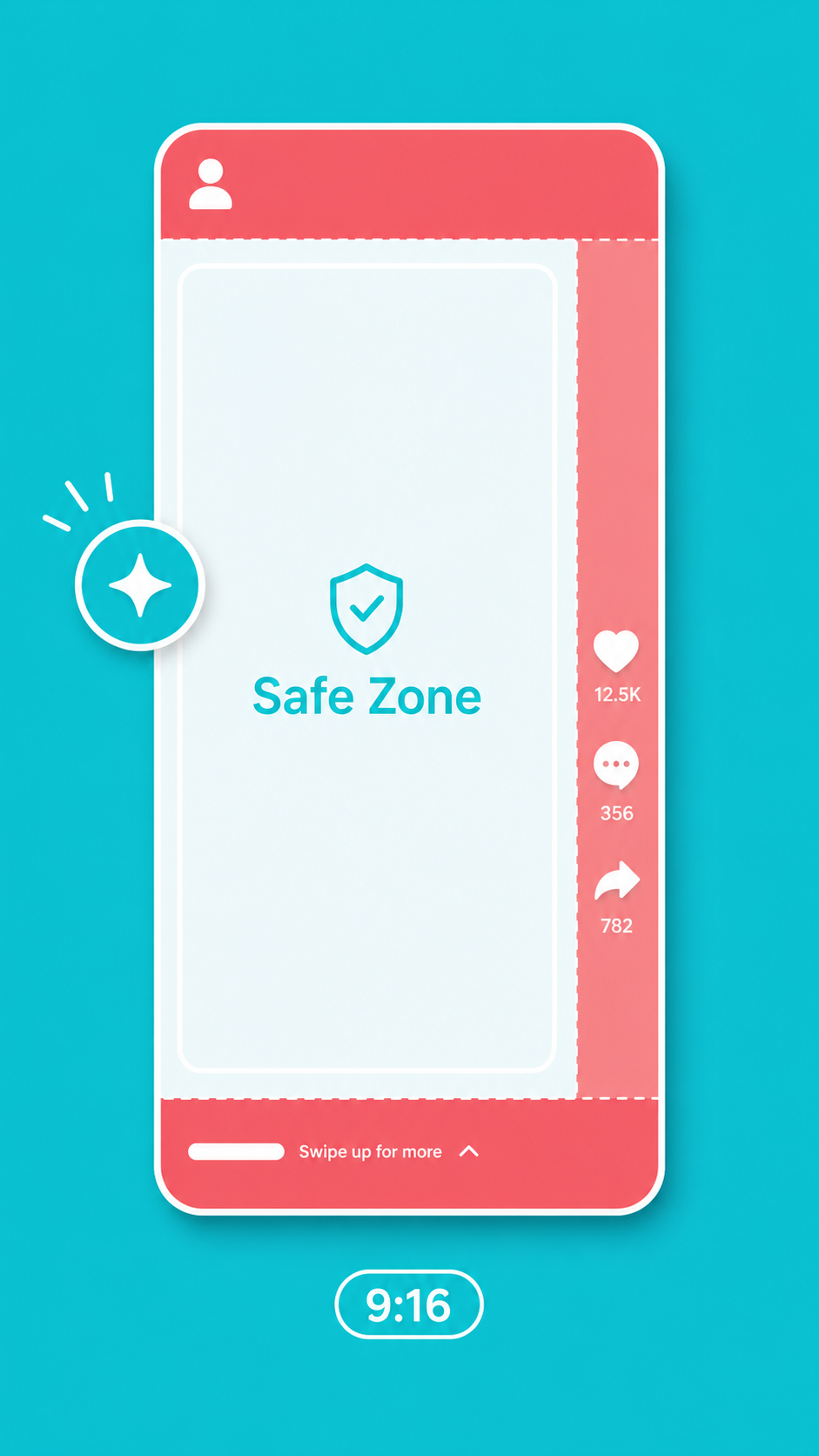
TikTok creative rarely fails because the art is bad. It fails because the interface sits on top of the part that mattered. The mistake we see most often is treating all 1080×1920 as usable canvas. It isn't. TikTok stacks its own UI on your frame: the avatar, the vertical row of like/comment/share icons, captions, the CTA button, the scrolling audio bar. That headline you spent an hour on has a good chance of landing directly under the like button.
No theory here. Sizes, safe zones, and the specific things we've gotten wrong.
The base size: one number to remember
Paid and organic use the same frame:
| Item | Spec |
|---|---|
| Aspect ratio | 9:16 (vertical, full screen) |
| Resolution | 1080×1920 as a production baseline (TikTok publishes a 540×960 minimum, not a recommended size) |
| Source file | Start from a clean source at least 1080px wide |
| Still images | Same 9:16, 1080×1920 |
Whether square or landscape is accepted depends on the ad format. Even when it runs, you can end up with letterboxing, a crop, or a lot of dead screen. Unless a placement demands otherwise, make 9:16 the default. It's also why we cut multi-channel work from a single 9:16 master and adapt down from there for TikTok, Instagram Reels, and Stories, checking each preview separately.
The safe zone: you only get the middle
This is the one section to remember. Inside that 1080×1920, all four edges are contested:
| Edge | What TikTok puts there | What to do about it |
|---|---|---|
| Top | Search, account, and status information | Don't push headlines to the top edge |
| Bottom | Caption copy, audio bar, CTA button, shop module | Keep your own CTA away from the bottom |
| Right | Like, comment, share, and profile controls | Pull the product and any type toward center |
| Left | Caption start and system margin | Leave breathing room |
The bottom is usually the worst of it. CTA button, ad description, track info, and product modules can all stack up at once, and how much they take depends on the format and which components are switched on.
So start by pulling the headline, the product, and the CTA into the middle of the frame, then check the preview against the captions and components you're actually running. Don't take one set of pixel values and assume it holds on every device.
Our production rule is blunt: anything that has to be read goes in the middle third. That lowers the odds of a collision with the interface. It doesn't replace checking the live placement preview.
Why you can't hardcode the safe zone
TikTok's interface, caption length, engagement components, and Shop cards all change how much room you actually have. Any safe zone quoted "to the pixel" is a production baseline for one template, not a guarantee across devices. Before the final layout ships, run it through the preview or safe-zone tool in Ads Manager, one placement at a time.
6 things that go wrong
Roughly ordered by how much damage they do:
- CTA parked at the bottom. The number one killer. Your button lands right under TikTok's own CTA and audio bar. Move it up.
- Burned-in captions hugging the bottom edge. If you're baking subtitles into the video, keep them in the lower part of the safe zone, not against the edge.
- Critical elements on the right. That column belongs to the engagement controls. A logo or a key claim placed there is at risk of being covered.
- Upscaling a low-res source. Start from a clean 1080px-wide file. Blowing up a small asset before upload shows.
- Reusing a landscape set as-is. The target format will letterbox or crop it, and you've paid for a full-screen canvas without using it.
- Forgetting the Shop card. Add a product card and the bottom gets eaten further than your standard template assumes.
Spending less time on sizes
The tedious part isn't remembering the numbers. It's that one piece of content has to ship in N formats across N channels. TikTok wants 9:16, Meta feed wants 4:5, Xiaohongshu wants 3:4. Resizing them by hand burns an afternoon.
That's what we built Image Fission to handle: one master image, per-channel ratios out the other side, with TikTok delivered at 9:16, 1080×1920, and fission strength controlling how much of the layout, creative DNA, or hard product facts stays locked. It takes the repetitive resizing off your plate. It doesn't excuse you from checking safe zones in TikTok's own preview before you publish.
Specs vary a lot between platforms. Meta's are in a separate piece, Facebook & Instagram ad image sizes. If you're also running on Xiaohongshu, the Xiaohongshu (RED) image size guide covers that platform, and between the three you'll have 9:16, 4:5, and 3:4 baselines settled in one pass.
FAQ
Does TikTok creative have to be vertical?
Yes. Full-screen 9:16 is the native shape. Landscape and square get letterboxed or cropped, and you lose the immersion that makes the placement worth buying. Unless there's a specific reason to reuse landscape footage, default to 9:16.
Why does every article quote a different safe zone?
Because there isn't a fixed number. It shifts with the device, the caption length, the engagement components, and the ad format. An internal template is useful for laying out a first draft, but the final call has to come from the preview or safe-zone tool in TikTok Ads Manager.
Can I run still images on TikTok, and do the same sizes apply?
Whether image ads are available depends on your region, your account, and the format you pick. If Ads Manager offers them, build to the ratio, file, and safe-zone requirements that format publishes rather than borrowing the video spec. Either way, confirm your key elements in the live placement preview.
Sources
- TikTok Ads Manager: Auction In-Feed Ads specs and safe zones
- TikTok Ads Manager: TopView specs and preview requirements
Sources checked July 23, 2026. Safe zones change with format and components, so the official template and preview for your ad format are the final word.